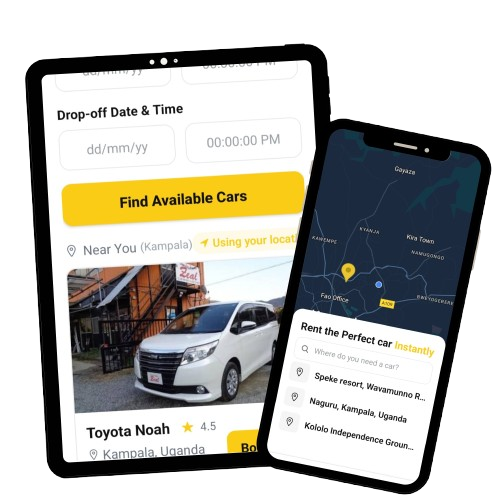
How FLYTS Works
Renting a car or sharing your vehicle has never been easier. Follow these simple steps to get started.
Renting a Car
Find and book the perfect car for your needs in just a few simple steps.
Choose Your Location
Enter your location and travel dates to browse available cars in your area.
Browse Available Cars
Filter by car type, price, and features to find the perfect vehicle for your trip.
Book Your Dates
Select your pickup and return dates and times that work best for you.
Confirm and Pay
Review your booking details and complete the secure payment process.
Pick Up the Car
Meet the car owner at the agreed location, check the car, and start your journey.
Booking a Car with Driver
Need a professional driver to handle the route? Book a host-provided chauffeur car on FLYTS — perfect for airport transfers, business trips, events, and occasions where you just want to sit back and relax.
Select "With Driver" Mode
On the FLYTS homepage, tap the "With Driver" toggle before searching. Results will show cars where the host also provides driving services.
Set Your Pick-up Point
Enter your pick-up location — your home, office, hotel, or the airport. Your driver will meet you there.
Book Your Dates & Pay
Select your trip dates and complete the secure payment via Paystack. Your booking is confirmed once the host accepts.
Your Driver Comes to You
The host's driver arrives at the agreed time and location. Sit back, relax, and enjoy the ride.
Rate Your Experience
After your trip, rate both the car and the driver. Your review helps the community and earns your driver recognition.
Sharing Your Car
Turn your car into a source of income when you're not using it.
List Your Car
Create a listing with photos, details, and availability of your vehicle.
Set Your Schedule
Define when your car is available and set your own pricing.
Approve Requests
Review and approve rental requests from verified renters. Only you accept or decline bookings — never FLYTS.
Hand Over the Keys
Meet the renter, check their license, and hand over the keys.
Get Paid
Your earnings are credited to your FLYTS wallet after each booking. Request a withdrawal in the app at any time.
Frequently Asked Questions
How do I know the cars are safe?
Every host is identity-verified and every car is inspected and approved by our team before it can be listed. Hosts maintain their own vehicles, and both sides photograph the car's condition before and after each trip to keep things fair.
What if I need to cancel my booking?
You can cancel your booking up to 24 hours before your trip for a full refund. Cancellations within 24 hours may be subject to a cancellation fee.
Is insurance included?
FLYTS does not currently provide platform insurance. Hosts are responsible for maintaining valid insurance on their own vehicles and for confirming their cover allows rental use. As a host you approve every booking and can verify the renter at handover; as a renter you're responsible for the vehicle during a self-drive trip as agreed with the host.
How do I get paid as a car owner?
Your earnings are credited to your FLYTS wallet as soon as a booking is paid. You can request a withdrawal from the app at any time, and funds are sent to your chosen payout method.
Get the FLYTS App
Download our mobile app for a better experience. Book cars, manage rentals, and get on the road faster.